How to Choose the Right Business Software for Your Company
Choosing software for your company can feel like a simple purchase until the wrong system starts slowing down your team, increasing costs, and creating new problems. The right business software solutions should do more than offer useful features—they should fit your workflows, support your goals, and grow with your company. With countless platforms, tools, and custom options available, knowing what truly matters can make the difference between a valuable investment and an expensive mistake. This guide shows you how to evaluate your needs and choose business software solutions that deliver lasting value.
Why Choosing the Right Business Software Matters
The software your company uses can influence how efficiently your team works, how smoothly operations run, and how easily the business responds to growth. Making the right choice starts with understanding the problems that technology should address rather than choosing a system simply because it is popular or feature-rich. Here are the key reasons why selecting the right business software solutions deserves careful consideration:
1. Manual Processes Can Limit Business Efficiency
Manual processes can consume valuable time, increase the risk of errors, and make it harder for teams to coordinate daily tasks. Repetitive activities such as data entry, reporting, invoicing, and record management can become major bottlenecks as a company grows. The right business software solutions can automate routine work, improve accuracy, and give employees more time to focus on productive activities.
2. Poor Software Choices Can Create Operational Problems
Choosing software based only on price, popularity, or a long list of features can create problems that affect the entire business. A system that does not match your workflows may cause compatibility issues, duplicate work, poor data management, and employee frustration. Carefully evaluating business software solutions helps companies avoid investing in tools that create more operational challenges than they solve.
3. The Right Software Can Support Business Growth
As a company grows, its processes, customer demands, workforce, and data requirements also change. Suitable software can help teams manage increasing workloads, improve collaboration, and maintain consistent operations without unnecessary complexity. Well-chosen business software solutions can therefore provide a foundation that supports both current activities and future expansion.
4. Business Software Should Solve Specific Business Needs
Every company has different processes, challenges, customers, and objectives, so software should not be selected simply because it works well for another business. Before comparing providers, identify the specific problems you need to solve and the outcomes you expect from the system. This approach makes it easier to find business software solutions that align with your operations rather than forcing your team to adapt to unsuitable technology.
5. Software Decisions Can Affect Long-Term Operations
Business software often becomes part of everyday operations, making the decision to adopt a system more significant than a short-term technology purchase. Factors such as scalability, integrations, security, usability, support, and ongoing costs can influence how valuable the software remains over time. Considering these factors when evaluating business software solutions can help your company choose a system that remains useful as its needs evolve.
What Are Business Software Solutions?
Understanding what business software solutions actually involve makes it easier to evaluate which systems are worth investing in for your company. These solutions can range from simple tools that handle individual tasks to integrated platforms that support multiple areas of business operations. Before choosing a system, consider how software can improve the way different parts of your company work:
1. Business Software Connects and Supports Business Processes
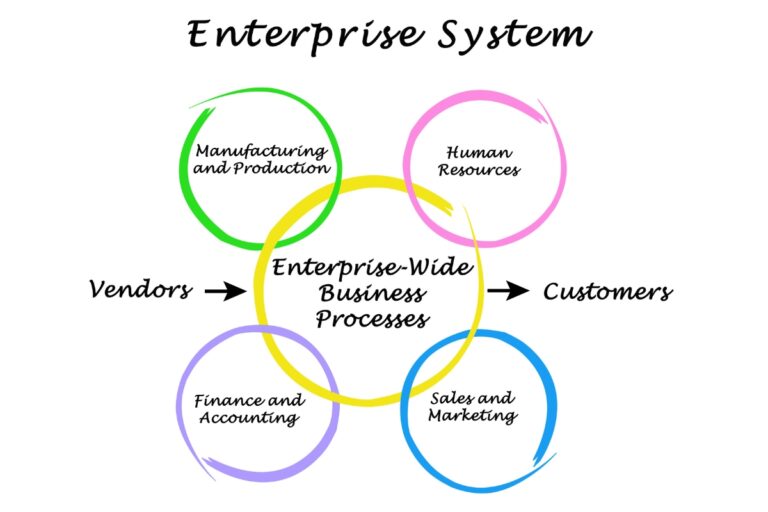
Business software helps companies organize, manage, and coordinate the processes that keep daily operations running. It can support activities such as sales, finance, customer management, inventory, communication, project management, and human resources within structured digital workflows. Effective business software solutions bring these activities together, making it easier for employees to complete tasks and maintain consistent processes.
2. Different Software Serves Different Business Functions
Not every software system is designed to perform the same role, and companies may need different tools depending on their operations and objectives. Accounting software can manage financial records, CRM platforms can organize customer relationships, while project management systems can help teams coordinate assignments and deadlines. Understanding these differences helps businesses select business software solutions that directly address their specific functional requirements.
3. Business Software Can Automate Repetitive Tasks
Many businesses spend significant amounts of time on repetitive activities that can be handled more efficiently through automation. Software can automate tasks such as sending notifications, generating invoices, updating records, processing approvals, and producing routine reports. By reducing unnecessary manual work, business software solutions can improve productivity while allowing employees to concentrate on activities that require greater attention and decision-making.
4. Software Can Improve Data Management and Reporting
Accurate and accessible data helps business leaders understand performance and make informed decisions. Business software can collect information from daily activities, organize it in a structured format, and generate reports that reveal important trends and performance indicators. With the right business software solutions, companies can reduce scattered records, improve data accuracy, and gain clearer insights into their operations.
5. Business Software Can Connect Different Departments
Departments often depend on information from one another, yet disconnected systems can make sharing that information slow and difficult. Integrated software can allow teams such as sales, finance, marketing, operations, and customer support to access relevant information through connected workflows. This makes business software solutions valuable for improving collaboration, reducing information gaps, and creating a more coordinated approach to business management.
What Should You Assess Before Choosing Business Software?
Choosing software becomes easier when you first understand how your company currently operates and where technology could make the biggest difference. A clear assessment prevents you from paying for unnecessary features while ensuring the system can support your teams, workflows, and objectives. Before comparing business software solutions, assess these important areas:
1. Identify Your Current Business Processes
Start by documenting how your company handles its key activities from beginning to end. Look at processes such as sales, finance, customer management, inventory, communication, reporting, and project delivery to understand what happens, who handles each task, and where information moves. This gives you a practical foundation for determining which business software solutions can improve your existing workflows.
2. Identify Operational Problems and Bottlenecks
Look closely at the areas where work is delayed, duplicated, frequently corrected, or dependent on manual intervention. Bottlenecks may occur when employees rely on spreadsheets, paper records, disconnected systems, or lengthy approval processes to complete routine activities. Identifying these problems helps you focus on business software solutions that address genuine operational weaknesses rather than adding technology without a clear purpose.
3. Define Your Business Goals
Your software decision should support what you want the company to achieve in the short and long term. Consider whether your priorities include improving productivity, increasing sales, reducing operating costs, strengthening customer service, improving reporting, or preparing for expansion. Clear goals allow you to evaluate business software solutions based on measurable business outcomes instead of simply comparing feature lists.
4. Determine the Features Your Business Needs
Once you understand your goals and challenges, identify the features that are essential for your operations. Separate must-have capabilities from useful extras so that your team does not end up paying for functions it will rarely use. This helps you compare business software solutions more objectively and select a system that provides the functionality your company actually requires.
5. Assess Your Existing Technology
Review the hardware, software, databases, communication tools, and other technologies your company already uses. This assessment can reveal compatibility issues, outdated systems, duplicate tools, and areas where new software needs to work alongside existing technology. Understanding your current technology environment helps you choose business software solutions that can be introduced without creating unnecessary disruption.
6. Consider the Number of Users and Departments
The size of your workforce and the number of departments using the system can significantly influence your software requirements. Consider how many people need access, what permissions each user requires, and whether different teams need separate workflows or shared information. Business software solutions should accommodate your organizational structure while making collaboration and access management straightforward.
7. Identify Integration Requirements
Determine which existing platforms your new software needs to communicate with before making a decision. Your company may need integrations with accounting systems, payment platforms, CRM tools, websites, communication applications, or other operational software. Choosing business software solutions with suitable integration capabilities can reduce duplicate data entry and help information move efficiently between systems.
8. Consider Future Business Growth
Software should support your company beyond its current size and requirements. Think about how your number of employees, customers, transactions, locations, departments, and data needs may change as the business expands. Selecting scalable business software solutions can help you avoid replacing an otherwise useful system when your company outgrows its initial capabilities.

Should You Choose Custom or Ready-Made Business Software?
Choosing between custom and ready-made software depends on how closely available products match your company’s processes and objectives. Ready-made systems can provide convenience and established functionality, while custom development can offer greater control over unique requirements. Consider these factors when deciding which type of business software solutions best fits your company:
1. When Ready-Made Software May Be Suitable
Ready-made software may be appropriate when your business follows common processes that existing platforms can support effectively. These systems can provide proven features, faster deployment, regular updates, and established support without requiring development from the ground up. For companies with straightforward requirements, ready-made business software solutions can provide practical functionality without the complexity of custom development.
2. When Custom Software May Be Necessary
Custom software may become necessary when your business has specialized workflows, unique operational requirements, or processes that standard products cannot handle effectively. It can be designed around your specific users, functions, integrations, and long-term objectives rather than requiring your team to work around predefined limitations. Custom business software solutions can therefore provide greater control when standard systems cannot deliver the required fit.
3. Comparing Flexibility and Customization
Flexibility is an important difference between ready-made and custom software. Ready-made platforms usually provide a defined set of features and may offer limited configuration, while custom systems can be developed and adjusted around your company’s processes. When evaluating business software solutions, consider how much control you need over workflows, features, interfaces, permissions, and future changes.
4. Comparing Implementation Time
Implementation time can vary significantly depending on the type and complexity of software you choose. Ready-made systems may be deployed relatively quickly because the core product has already been developed, while custom software requires planning, development, testing, and implementation. Businesses should balance the need for quick access to business software solutions with the time required to achieve a system that properly meets their needs.
5. Comparing Costs and Long-Term Value
The initial cost is only one part of the financial decision when comparing software options. Ready-made software may have lower upfront costs but can involve recurring subscriptions, additional user fees, customization charges, or costs for multiple platforms, while custom development can require a larger initial investment. Comparing the total cost, expected benefits, maintenance requirements, and long-term usefulness of business software solutions can help you make a more sustainable decision.
6. Considering Integration Requirements
Your existing technology environment should influence whether you choose a ready-made or custom system. A ready-made platform may provide integrations with common tools, but businesses with complex or specialized integration requirements may need a more tailored approach. Assessing how business software solutions will connect with your websites, databases, payment platforms, accounting systems, and other technologies can prevent compatibility problems later.
7. Choosing Based on Your Business Processes
The final decision should come down to how effectively the software can support the way your company actually operates. Consider your workflows, employees, customers, data, growth plans, budget, and technology requirements before choosing between a standard product and a custom system. The best business software solutions are those that solve your current challenges while providing enough flexibility to support the direction your business is heading.
What Benefits Can the Right Business Software Provide?
The right software can transform everyday business activities by making processes more organized, connected, and easier to manage. Beyond automating tasks, effective business software solutions can give teams better access to information, improve customer interactions, and support more informed decisions. When the system matches your company’s needs, you can expect several practical benefits:

1. Improved Operational Efficiency
The right software can streamline workflows by bringing important tasks, information, and processes into a more organized digital environment. Employees can complete activities faster, reduce unnecessary steps, and spend more time on work that directly contributes to business objectives. Well-designed business software solutions can therefore improve productivity across different areas of the company.
2. Reduced Repetitive Administrative Work
Routine administrative activities can take up significant amounts of employee time when handled manually. Software can automate tasks such as data entry, scheduling, invoicing, notifications, approvals, and recurring reports. By reducing repetitive workloads, business software solutions allow employees to focus more attention on tasks that require judgment, creativity, and customer interaction.
3. Better Business Data Management
A centralized software system can make it easier to collect, organize, update, and retrieve important business information. Employees can work with more consistent records instead of relying on scattered spreadsheets, documents, or disconnected systems. Effective business software solutions improve data management while making important information easier to access when needed.
4. Faster Decision-Making
Business leaders need accurate information to make timely decisions about operations, finances, customers, and growth. Software can provide dashboards, reports, analytics, and real-time information that make important trends and performance indicators easier to understand. Business software solutions with strong reporting capabilities can help decision-makers respond to opportunities and challenges more quickly.
5. Improved Team Collaboration
When employees can access relevant information and coordinate tasks through a shared system, collaboration becomes easier. Software can help teams communicate, assign responsibilities, track progress, share records, and coordinate workflows across departments. This makes business software solutions particularly valuable for companies where multiple teams contribute to the same processes.
6. Greater Process Visibility
Software can provide a clearer view of what is happening across important business processes. Managers can track tasks, monitor performance, identify delays, and understand where work currently stands without depending entirely on manual updates. Greater visibility through business software solutions can help companies identify problems earlier and maintain better operational control.
7. Reduced Human Errors
Manual data entry and repetitive processes can increase the likelihood of mistakes that affect records, reports, customer service, and financial activities. Automation, validation rules, standardized workflows, and centralized information can reduce many of these avoidable errors. Reliable business software solutions can therefore improve consistency and accuracy across everyday operations.
8. Better Customer Service
Software can help businesses organize customer information, track interactions, respond to enquiries, and manage service-related processes more efficiently. Employees can access relevant customer details faster and provide more consistent support across different touchpoints. The right business software solutions can strengthen the overall customer experience while helping teams manage growing customer demands.
9. Improved Scalability
As a company grows, managing more employees, customers, transactions, and information can place pressure on existing processes. Scalable software can help businesses handle increasing workloads without relying on proportional increases in manual effort. Choosing adaptable business software solutions can give your company a stronger operational foundation for sustainable growth.
What Challenges Can Businesses Face When Selecting Software?
Choosing business software can become complicated when a company does not have a clear understanding of its requirements, budget, or long-term objectives. Even a system with strong features can create difficulties when it does not fit existing processes, technologies, or employees. Understanding these common challenges can help you evaluate business software solutions more carefully:
1. Unclear Business Requirements
Businesses may struggle to choose suitable software when they have not clearly defined the problems they want to solve. Without documented requirements, decision-makers can easily focus on attractive features while overlooking important workflows, user needs, or operational gaps. Clearly defining business requirements makes it easier to identify business software solutions that provide genuine value.
2. Too Many Software Options
The growing number of software products can make the selection process overwhelming. Different providers may offer similar functions, pricing models, integrations, and levels of support, making it difficult to determine which option is genuinely suitable. A structured evaluation process helps businesses narrow down business software solutions based on their specific priorities.
3. Choosing Features You Do Not Need
Some businesses choose software because it offers a large number of features rather than because those features solve real problems. Paying for unnecessary functionality can increase costs, complicate the user experience, and make implementation more difficult. Businesses should focus on business software solutions that provide the capabilities their teams actually need.
4. Difficulty Integrating Existing Systems
New software may create operational problems when it cannot communicate effectively with existing systems. Poor integration can result in duplicate data entry, inconsistent records, manual workarounds, and disconnected workflows. Before selecting business software solutions, businesses should confirm that the system can integrate with the technologies they already depend on.
5. Employee Resistance to New Software
Employees may resist new software when they are comfortable with existing processes or believe the new system will make their work more difficult. Limited training, poor communication, and complicated interfaces can increase this resistance. Choosing user-friendly business software solutions and providing appropriate training can encourage adoption across the organization.
6. Unexpected Implementation Costs
The cost of software can extend beyond the initial purchase or subscription price. Implementation may involve customization, data migration, integrations, training, hardware, maintenance, and additional user fees that increase the overall investment. Businesses should calculate the total cost of business software solutions before making a final decision.
7. Data Migration Challenges
Moving existing information into a new system can be complicated, especially when records are stored across multiple platforms or contain inconsistencies. Poorly managed migration can result in missing information, duplicate records, formatting problems, or operational disruptions. Businesses should assess migration requirements early when evaluating business software solutions.
8. Poor Vendor Support
A software provider may offer a strong product but provide inadequate support when customers encounter technical or operational problems. Slow responses, limited training, unclear documentation, or unreliable maintenance can make it difficult for businesses to get full value from their investment. Evaluating vendor reputation and support services is therefore important when comparing business software solutions.
9. Choosing Software That Cannot Scale
A system may meet your current needs but become restrictive as the company grows. Increasing users, transactions, departments, customers, and data can expose limitations that were not obvious during the initial selection process. Choosing scalable business software solutions can help your company avoid costly replacements and disruptions as its operational requirements expand.
How Much Should You Invest in Business Software?
Determining how much to invest in software requires looking beyond the advertised purchase price and considering the full cost of owning and operating the system. Different companies will have different budgets depending on their size, requirements, technology environment, and growth plans. When evaluating business software solutions, consider these costs and the long-term value the investment can provide:
1. Software Licensing and Subscription Costs
Ready-made software may involve one-time licensing fees, monthly subscriptions, annual plans, or charges based on the number of users. Compare the pricing structure carefully and determine which costs are recurring and which are included in the standard package. Understanding these expenses helps you establish a realistic budget for business software solutions.
2. Custom Software Development Costs
Custom software can require a larger initial investment because the system is designed and developed around specific business requirements. Costs may vary depending on the complexity of the features, number of users, integrations, technology involved, and development time required. Businesses should assess whether the additional flexibility of custom business software solutions justifies the investment.
3. Implementation and Configuration Costs
Getting new software ready for actual business use may involve setup, configuration, workflow adjustments, account creation, testing, and other implementation activities. Some providers include basic implementation in their pricing, while others charge separately for these services. Include implementation expenses when calculating the total cost of business software solutions.
4. Integration Costs
Connecting new software with existing systems can require additional development, configuration, APIs, middleware, or specialist support. The cost depends on the number and complexity of integrations your business requires. Factoring these expenses into your budget helps prevent unexpected costs when implementing business software solutions.
5. Data Migration Costs
Moving information from existing systems into a new platform can involve data cleaning, formatting, transfer, validation, and testing. Larger businesses or those working with multiple disconnected systems may require more extensive migration work. Consider these requirements when estimating the complete investment in business software solutions.
6. Employee Training Costs
Employees may need training before they can use a new system confidently and efficiently. Training expenses can include provider-led sessions, internal training time, documentation, workshops, and ongoing support for new users. Investing in proper training can help your business get greater value from its business software solutions.
7. Maintenance and Support Costs
Software may require ongoing technical support, maintenance, security updates, monitoring, troubleshooting, and system administration after implementation. These costs can vary depending on the provider, software type, service agreement, and level of support required. Include ongoing maintenance when comparing the long-term affordability of business software solutions.
8. Future Upgrades and Scaling Costs
Your software costs may increase as your business grows or your requirements change. Additional users, features, storage, integrations, locations, upgrades, and system capacity can all affect future spending. Choosing business software solutions with predictable and manageable scaling costs can make long-term budgeting easier.
9. Evaluating the Long-Term Return on Investment
The value of software should ultimately be assessed against what it can help your company achieve. Consider potential gains such as reduced manual work, improved productivity, fewer errors, better customer service, faster decision-making, and increased revenue opportunities. Evaluating the expected return on investment helps you determine whether business software solutions are worth the total cost over their useful life.
What Common Mistakes Should You Avoid When Choosing Business Software?
Choosing software without carefully evaluating your company’s needs can lead to unnecessary costs, poor adoption, and operational difficulties. Even systems with strong capabilities can become ineffective when businesses overlook important factors such as integration, security, scalability, and employee requirements. Avoid these common mistakes when selecting business software solutions:

1. Choosing Software Based Only on Price
Selecting the cheapest software may seem financially sensible, but a low price does not always mean better value. An inexpensive system may lack essential features, provide limited support, or create additional costs through customization and integrations. Evaluate business software solutions based on their overall value and ability to meet your requirements rather than focusing on price alone.
2. Selecting Software Without Defining Business Requirements
Businesses can make poor technology decisions when they start comparing products before identifying what they actually need. Without clear requirements, decision-makers may choose software that looks impressive but fails to address important workflows and operational problems. Defining your requirements first helps you identify business software solutions that directly support your company’s objectives.
3. Buying Too Many Features
A software system with numerous features is not necessarily the best option for every business. Paying for capabilities your employees rarely use can increase costs while making the system more complicated to operate and maintain. Focus on business software solutions that provide the essential functionality your company needs now and can reasonably support in the future.
4. Ignoring Employee Needs
Employees are the people who will interact with the software regularly, so their needs should influence the selection process. Ignoring their workflows, technical abilities, and practical concerns can lead to low adoption and resistance after implementation. Choosing user-friendly business software solutions and involving employees early can improve acceptance and productivity.
5. Overlooking Integration Requirements
A new system that cannot communicate with your existing technology can create unnecessary manual work and disconnected processes. Businesses should identify the platforms, databases, websites, payment systems, and other tools that need to exchange information with the new software. Evaluating integration capabilities early helps ensure business software solutions fit effectively into your existing technology environment.
6. Ignoring Security and Data Protection
Security should never be treated as an optional consideration when choosing software that handles business or customer information. Failing to examine access controls, authentication, backups, encryption, and other security measures can expose your company to data loss and unauthorized access. Prioritizing secure business software solutions helps protect important information and maintain operational confidence.
7. Failing to Consider Scalability
Software that works for a small company today may become restrictive as the business expands. More employees, customers, transactions, departments, and data can place greater demands on the system and expose limitations. Choosing scalable business software solutions can help your company avoid expensive replacements and disruptions as its requirements grow.
8. Underestimating Implementation Costs
The software purchase or subscription is often only one part of the total investment. Implementation may also require configuration, customization, data migration, integrations, training, testing, and technical support. Accounting for these expenses from the beginning provides a more accurate picture of the actual cost of business software solutions.
9. Choosing a Vendor Without Evaluating Support
A software provider’s support can significantly affect your experience after implementation. Failing to assess response times, maintenance, updates, technical assistance, documentation, and service agreements can leave your team struggling when problems occur. Reliable vendor support is an important factor when comparing business software solutions for long-term use.
10. Failing to Plan for Software Adoption
Purchasing software does not automatically mean employees will use it effectively. Without communication, training, clear responsibilities, and ongoing support, teams may continue relying on old processes or use only a small portion of the system’s capabilities. A practical adoption plan helps your company get the full value from its chosen business software solutions.

Choose the Right Business Software Solutions With Smepal Consultancy Agency Today!
Choosing the right software starts with understanding how your company currently operates and where technology can create meaningful improvements. At Smepal Consultancy Agency, we assess your processes, software needs, operational challenges, and growth objectives to identify opportunities for automation and better digital management. We then help you evaluate suitable systems, develop custom digital solutions where necessary, connect existing platforms, and support implementation for smoother adoption. Contact Smepal Consultancy Agency today for a business software consultation and let us help you identify the right technology approach for your company.